Activity List Report
An Activity List report can be printed from the Activities tile. Before printing, the Activities tile needs to be filtered for the amount of days to retrieve information and the type of activity, if required.
Setting up the Printer
You can indicate which printer you want the Activity List report to print in  > Pharmacy > System. For the Activities Report, select the printer from the Printer dropdown and select Save.

Printing the Report
-
From the Workbench, select the Activities tile.
-
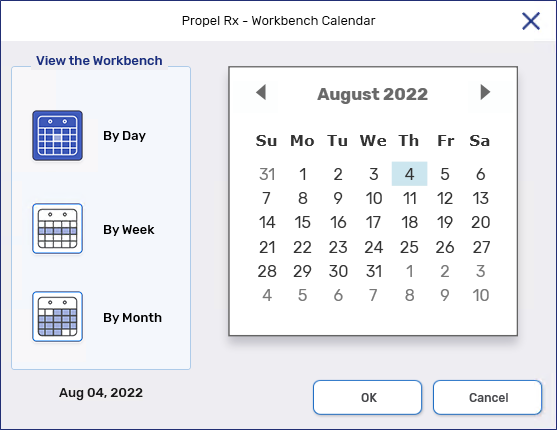
To change the amount of days worth of activities that are displayed, select the calendar button
 . The Workbench Calendar window opens.
 -
Select how you want the information in the Activities tile to display.
-
By Day - select the specific day you want to display activities for.
-
By Week - select the specific week you want to display activities for.
-
By Month - select the specific month you want to display activities for.
-
-
Select OK. The Workbench Calendar window closes. The information that displays is updated.
-
From the Display dropdown, select the Status of activities that you want to display. The Activities tile is updated accordingly.

-
In the Filter field, enter what you want to filter the Activities tile by. Ensure you press the Enter key on your keyboard to apply the filter. The Activities tile is updated accordingly.

-
Select Print.
Once done, remember to remove the filters you applied to view the Activities tile as usual.
 Activity List Report Sample